Flow
The recipe a run follows - its ordered steps, and the kind of worker each step needs.
In simple words
A Flow is a recipe. It lists the steps to work through, in order, and says what kind of worker each step needs: someone to plan, someone to build, someone to review.
What it never says is which AI model. A flow describes the process; your crew supplies the people, so a flow a stranger wrote runs on your models, at your budget, unedited. Each slot a step asks for is a seat, and seat covers those next.
Flows in the sidebar is the catalog: vibe ui opens the dashboard on 127.0.0.1:4317, and every flow this project can run is a card there. New flow and Import sit in the header; a card’s menu holds Set as default, Customize, Export and, for a project flow, Edit definition and Delete.
“Always review on a different vendor” is a crew setting, not a flow setting. Nothing on a flow card names a model.
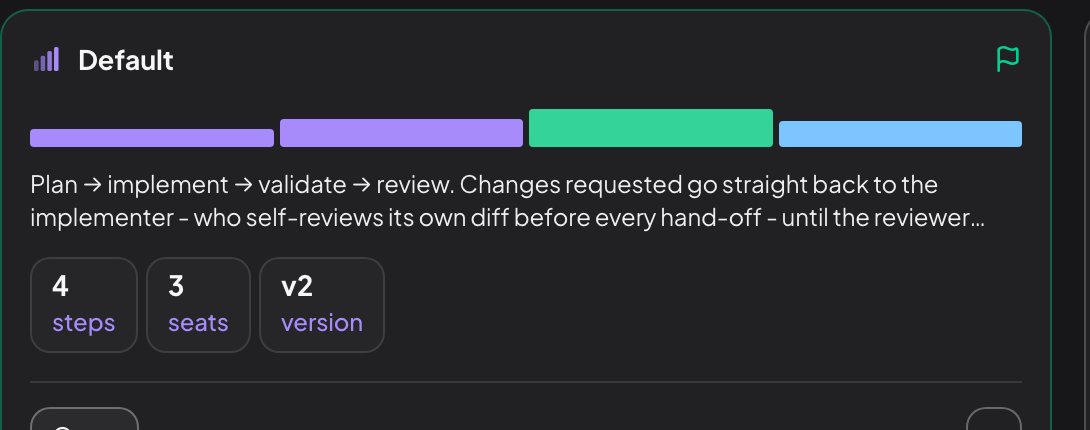
The bar is the flow itself, coloured by what each step does, and the legend under the page header decodes it: Build produces or changes work, Review judges it, Check runs commands that pass or fail, Gate stops for a person. The tiles count steps and seats, add a gates tile when the flow has any, and a version tile when it declares one. The default flow has no approval-gate step, which is why its card carries three.
Vibestrate ships sixteen flows and offers thirteen in the pickers; the hidden three are the spec-up chain. default is the four-step loop above, deep is the longer pipeline that adds an architecture pass, a dedicated fixer and a verify gate, express is a single implementer turn for small, low-risk work, and plan-only writes no code at all. You do not have to write a flow to get a different shape of run.
Which flow a run uses
defaultFlow starts unset, so a run with no flow named gets one decided per task. Every run prints the flow it resolved and where that choice came from.
You named one
The New run composer’s Flow picker, or --flow. Sizing and the persona upgrade do not apply.
You set a project default
defaultFlow in project.yml, or Set as default on a card. That also turns sizing off, though a persona can still upgrade the pick.
You asked for a pick
--select hands the choice to the orchestrator, which reads the task against the available flows. It costs a model call.
Vibestrate picks
With none of the above, sizing reads the task text and may route it to express. It only ever picks the leaner option, and is structural rather than a model call unless you set flowSizing: assisted. Your supervisor persona then gets a look: a task matching one of its risk signals moves to a heavier flow, never a lighter one.
Spec-up sits outside all four. It runs before whichever flow was chosen, and that flow then runs seeded with the resulting spec. --flow does not skip it, since that flow is what spec-up builds towards. --no-select skips it for one run; adaptiveSpecUp: off stops it entirely.
Where the model actually comes from
A flow step has no model, provider, or profile field. Everything past the seat is yours:
The flow writes the first box and names the second; the last three belong to your crew. Pin the reviewer role to a profile there and every flow you run gets that reviewer; --step-profile changes one step for one run.
What a flow carries
The whole type, field by field. Read it once and the portability claim stops being a slogan: there is no field here that could hold a model, a provider or a price.
| Field | What it is |
|---|---|
id | The token a run selects it by, unique in the catalog. |
version | Bumped when the shape changes, so an imported flow declares its vintage. |
label, description | What the card shows. |
seats | The slots this flow needs filled, keyed by seat id. Your crew answers them. |
steps | The ordered work. One step each. |
loop | One bounded cycle: from, to, decisionStep, maxIterations. |
params | Typed inputs the flow asks for once and reuses. |
checklistSegment | The part that repeats per checklist item on a pick-up run. |
checklistReview | The per-item review band, and the lenses it reviews under. |
complexity, capabilities | What the flow selector reads when it picks for you. |
hidden | Keeps a flow out of the pickers. The spec-up chain uses it. |
A flow is closed: its two references point at its own types, and its steps hand work to each other through named inputs and outputs.
Only seats and steps are references, and both point inward at the flow’s own
types. Annotated YAML is in Flow YAML; the shape is
flowDefinitionSchema in src/flows/schemas/flow-schema.ts.
When you would write one
Most of the time you should not: a clearer task description or a skill nudges the default flow for less effort. Write your own when:
The same review keeps repeating You add the same two checks to every task by hand. Put them in a flow once.
A change should always pause Anything touching migrations stops for your approval at a set point, every time.
One step needs its own brief
Two steps can share the reviewer seat and read the same diff through different lenses - one for correctness, one for security.
You want to share it A flow is a YAML file. It travels to a teammate, or to the hub, and still runs on their crew.
Making one in the dashboard
The Flows page has four ways in. Draft a flow takes a plain-English description and has the supervisor propose one, with its reasoning, steps and seats laid out; drafting writes nothing, and Save this flow is the step that does. New flow starts blank. Customize, on a built-in’s card menu, copies that flow into your project. Import takes Paste YAML or a URL, validated against the schema, refused if it carries secrets, with URL fetches size- and time-bounded.
Open on a card lands in the Flow Builder. The flow’s name is the page title and edits in place; the steps list on the left adds, removes and drag-reorders; the inspector on the right edits the selected step and the loop; Dry run resolves the flow into the run it would create without starting one; Save changes writes to .vibestrate/flows/. The overflow menu carries Undo, Redo, Restore saved flow, Edit as YAML, Use as default and Delete flow. A built-in loads read-only with Fork to project in the primary slot, and the project copy shadows the built-in everywhere, including a plain vibe run.
The editor re-runs the real flow schema over the whole draft as you type, pinning each violation to the step, seat or field that caused it. Save stays disabled while any violation stands, and what it writes is the schema’s own parsed output, so a flow that passed in the form cannot be rejected on the way to disk. Fields the schema allows in only one shape appear only there: a step dependency turns the flow into a graph, retiring skipWhen and repeat counts and offering continueOnError and retries instead. Clearing the last dependency swaps back, dropping the values belonging to the shape you left rather than carrying them into a save the schema would refuse. Saving goes through the same guarded writer as vibe flows import, so a project policy that denies file writes stops the editor too. Every field is annotated in Flow YAML.
Pull a flow, at the foot of the same page, browses community flows from vibestrate.com and installs one through that same guarded writer. A hub flow is executable configuration, so the install says so, and the “curated” badge is a curation claim rather than an integrity guarantee. Publish a flow to the hub sends a project flow out as a public, immutable version.
In the terminal shell
vibe on its own opens the interactive shell. Press 2 for Flow: arrow keys select, Enter sets the selected flow as project default, f forks a built-in into the project, and h opens the hub, where / searches and Enter installs. The detail pane shows the flow’s steps and whether your crew covers its seats.
Automation: the CLI
# what this project has, and what a flow contains
vibe flows list
vibe flows show quality-arbitration

# run one
vibe run "Tighten the auth checks" \
  --flow quality-arbitration
vibe flows hub list browses the hub and vibe flows hub install pulls one into .vibestrate/flows/. vibe flows draft and vibe flows derive print a draft and write nothing; vibe flows import adopts one. vibe flows use sets the default flow, --clear unsets it.
--step-profile swaps the profile for a single step of a single run. Same role, different runtime:
vibe profile add codex-review --provider codex

vibe run "Tighten the auth checks" \
  --flow default \
  --step-profile review=codex-review
It needs --flow, because step ids belong to a named flow. An id not in that flow is refused before the run starts: Profile override references unknown Flow step "reveiw".
Next: workflow walks the four steps of the default flow, one at a time.
