
Run state
The status a run is in, what each one means, and the rules that keep moves between them honest.
In simple words
A run is always in exactly one state, never two at once and never one the tracking invented.
On the dashboard that value is the Status column of All runs, behind Runs in the sidebar. The counts and the scheduler queue sit above the table; the sidebar repeats Active, Merge-ready and Failed as filters.
The four terminal states mean different things. blocked is a decision - something refused. failed is a crash - a step broke. aborted is you. Only merge_ready is a change you can take.
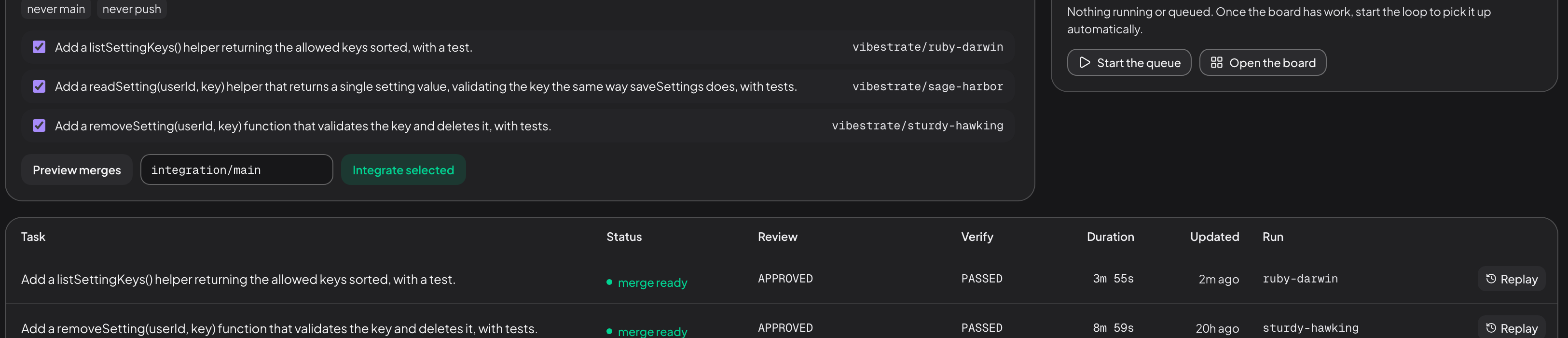
Review and Verify get their own columns because they are separate answers; Replay on any row opens that run’s timeline read-only. A run starts at created and ends in one of four terminal states:
Why the states are worth knowing
Knowing where to look
failed means read the failing step’s own output. blocked means read the review or the policy that refused.
Knowing what is recoverable A blocked run is usually one fix away. A failed one may be an environment problem rather than a code one.
Filtering the list The counts above the table roll sixteen statuses into total, active, merge-ready and failed.
There are sixteen statuses, and Vibestrate validates the value against that fixed set before writing it. A run cannot land in a state nobody defined, and it cannot skip from one to another along a path the state machine does not allow. The moves are enforced, not merely recorded.
Moving a run from the dashboard
Open a run and the status hero carries the controls that state allows: Pause and Abort while it runs, with Pause flipping to Resume once it has taken. A run holding at a gate shows an approval banner with Approve, Reject and, for an agent-raised gate, Request changes plus a box for the guidance the stage re-runs with. Mission control collects the same gates in Waiting on you, where Approve and Reject are one click and Details opens the run.
The same moves in the terminal
vibe (or vibe shell) opens the interactive shell. Its : palette carries Pause selected run, Resume selected run and Abort selected run; the Approvals tab decides gates with a to approve, r to reject and c to request changes.
The moves are enforced
Every allowed move is written into an explicit list, the ALLOWED_TRANSITIONS allowlist. A move that isn’t on it raises a StateTransitionError and stops, instead of happening quietly.
The four terminal statuses have no way back out. To start over, run the task again as a new run; the previous run’s artifacts stay where they are.
That is what makes runs replayable, pausable and auditable. A run that reads verifying is verifying: the verifier is running, the previous artifacts are committed, and there is no in-between fuzz.
The statuses
The canonical, generated list lives in the run-state reference.
| Status | Meaning |
|---|---|
created | Run record exists; orchestrator hasn’t picked it up yet. |
planning | Planner is running. |
planned | Plan is recorded; about to enter architecting. |
architecting | Architect is running. |
architected | Architecture recorded; about to execute. |
executing | Executor is editing files in the worktree. |
validating | Validation commands are running. |
reviewing | Reviewer is reading diff + validation output. |
fixing | Fixer is addressing review findings. |
verifying | Verifier is doing the final pass before merge. |
waiting_for_approval | Run is holding at a gate, awaiting a human decision. |
paused | User-requested pause. Resume returns to pausedAtStatus. |
merge_ready | Verifier passed. Diff is ready for the user to merge. |
blocked | Reviewer or verifier flagged the run unsafe to continue. |
failed | Unrecoverable error during a stage. |
aborted | User aborted explicitly. Worktree is preserved. |
Two kinds of pause
A stopped run is stopped for one of two reasons, and the Status column names which.
- A gate is open (
waiting_for_approval). Two things raise one: a project policy listing the stage inrequireApprovalAtStages, or an agent asking for your call before it continues. The banner’s overline says which. Request changes belongs to agent-raised gates, because a policy gate has no agent turn to re-run. - You asked for it (
paused). The flag is picked up at the next stage boundary, andpausedAtStatusremembers where to resume.
Both kinds survive a restart: the pause flag is on disk, so killing and restarting Vibestrate does not lose it.
Automation
Reachable from a script or over SSH; see the CLI overview.
vibe status
vibe status --json
vibe replay <runId>
vibe pause <runId>
vibe resume <runId>
Deciding a gate takes the run id plus the approval id that vibe approvals list prints:
vibe approvals list <runId>
vibe approvals approve <runId> <approvalId>
# reject marks the run blocked
vibe approvals reject <runId> <approvalId>
# agent-raised gates only
vibe approvals request-changes \
  <runId> <approvalId> --guidance "..."
Related
- Workflow - the stages that drive transitions.
- Task lifecycle - the same statuses, drawn as a transition diagram.
Next: worktree covers the copy of your repo a run works in.
